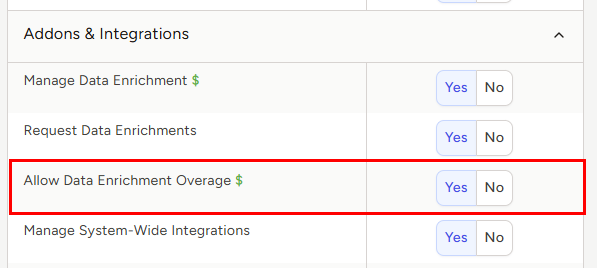
Setting Data Enrichment Overage Permissions
Each Data Enrichment subscription includes 100 credits per agency, per month. One credit is consumed each time a record is enriched. Once your monthly credit allotment has been exhausted, any additional enrichments will be billed at a rate of $0.50 per record (totaled and billed on your next invoice).
By default, new users are not permitted to go over your agency's limit. However, you can allow users to go over that limit by editing their individual user permissions.
Note: the ability to set data enrichment overage permissions is restricted to only those users that have permission to manage users
To set email overage permissions:
- Expand the Sidebar in the top right corner of the software and click on the Settings icon
- Click to expand the My Agency section and then select Manage Users

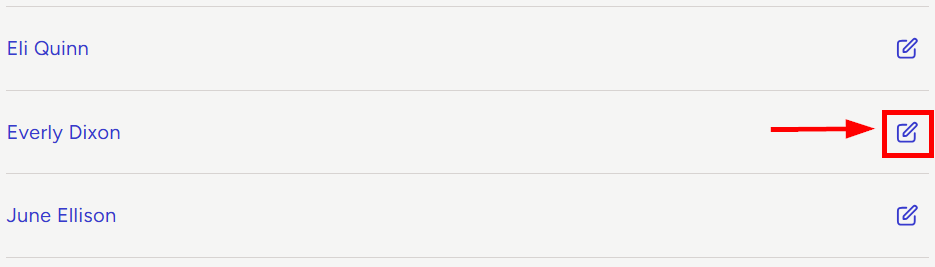
- All users on the account will populate on the left side of the Manage Users page
- Click on the edit icon to the right of the person you wish to allow or restrict from data enrichment overages
- Under the user’s Permissions on the right side of the User Profile, click to expand the Addons & Integrations section
- To the right of Allow Data Enrichment Overage, set the appropriate permissions
- Yes = this user can request data enrichments after your agency's monthly credit allotment has been exhausted. Any enrichments beyond the monthly credit limit will be billed at a rate of $0.50 per record.
- No = this user cannot request data enrichments once your agency's monthly credit allotment has been exhausted. Additional enrichments will be unavailable until credits are replenished.