
Natural Language Search
 This feature is only available on the Professional Tier
Natural Language Search allows you to search for people in your agency’s database by describing what you’re looking for in plain language. AI interprets the intent of your search and translates it into a structured people search.
This allows you begin a search faster without needing to determine which Advanced Search fields and filters to use upfront. Natural Language Search maps the details in your request to the available search criteria in TE Recruit, which you can review, modify, and refine before running the search again.
Note: Natural Language Search is designed for plain-language requests rather than Boolean search strings. It creates a starting point based on the intent of your prompt, but you should always review the generated search criteria to confirm they reflect what you are looking for.
For sample searches and tips for using Natural Language Search, review Examples and Best Practices.
Getting Started
- Navigate to People from the Main Navigation Bar
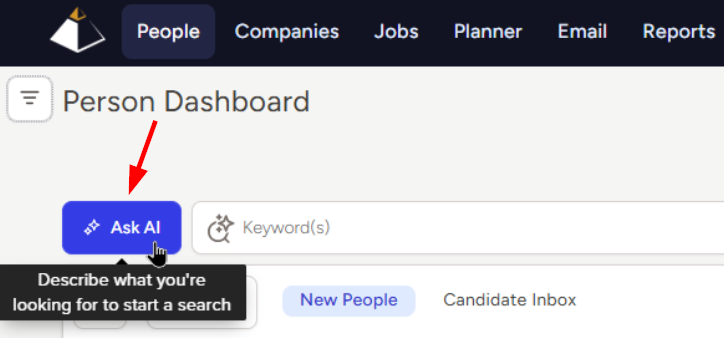
- Click the Ask AI button located to the left of the Keyword search field
- Describe your search using plain language in the text box
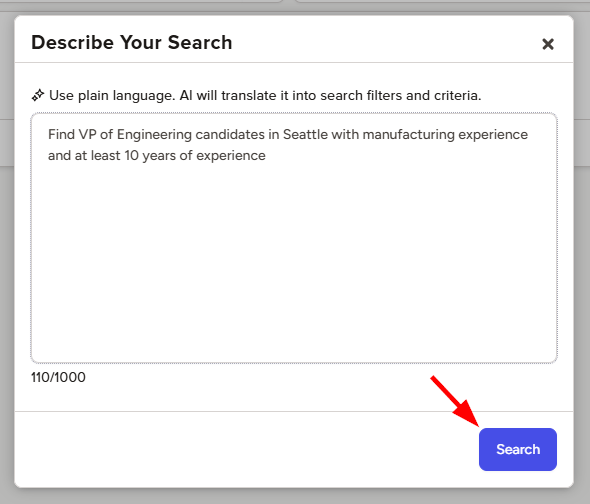
- For example: "Find VP of Engineering candidates in Seattle with manufacturing experience and at least 10 years of experience"
- Click Search
- Natural Language Search will interpret your request and translate the details into search filters and criteria
Review and refine your search
After Natural Language Search creates the search, review the generated search criteria to confirm the applied filters reflect what you intended. You can also click Ask AI again to review your original prompt.
Note: Natural Language Search does not currently apply Custom Field, Pipeline, or Hotlist criteria. You can add these criteria manually when reviewing and refining the generated search.
To review or update the search:
-
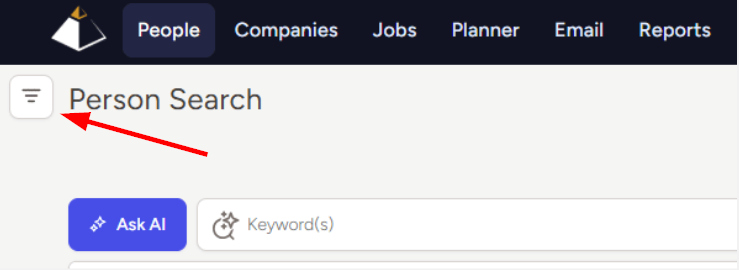
Open the Filters section in the upper-left corner of the page to review how your search was interpreted
- Remove applied criteria or add additional filters based on your search results
- Click the Modify Search button in the top right corner of your results to view the Advanced Search page to add or make more detailed changes to the search criteria
- Once you have made any desired changes, click Search to run a newly updated search
Examples & Best Practices
Natural Language Search can help you source candidates for a specific role or create broader searches to review and manage records. Use the examples below as inspiration when describing what you are looking for.
Search for Specific Candidates
Describe the qualifications, experience, location, or preferences that matter most for the role.
- "Find Senior Accountants or Accounting Managers who are certified CPAs"
- "I'm looking for a Plant Manager in Canton with manufacturing experience"
- "Find candidates willing to relocate with at least five years of project management experience"
Build Lists and Review Records
Use broader requests to identify groups of records for outreach, reporting, or database management.
- "Show me all person records modified in the last week"
- "Find all candidates willing to relocate"
- "Find all candidates added after May 6, 2026"
Best Practices
The following best practices can help Natural Language Search interpret your search more accurately to create criteria that better reflects your intent.
Focus on One Search Goal
Keep each request centered on one role, candidate profile, or group of records.
- Avoid combining unrelated search goals in the same request
- Use one location per request
- Create separate searches when you're searching for multiple locations
Lead with Clear, Objective Criteria
Start with the details that matter most to the search.
- Include relevant job titles, skills, experience, location, education, or certifications
- Prioritize required criteria before adding secondary preferences
- Avoid adding every possible criterion upfront, as this may make the search too restrictive
- Describe the qualifications that make a record relevant instead of asking Natural Language Search to rank records or identify a specific number of “best candidates,” “top performers,” or people with “great culture fit”
Be Specific Where It Matters
Use precise language when dates, ranges, or thresholds should affect the search.
- Specify exact dates or clear timeframes, such as “added after May 6, 2026” or “modified in the last 30 days”
- Clearly state minimums and maximums, such as “at least five years of experience”
- Include a specific distance when location radius matters, such as “within 25 miles of Cleveland”
- Avoid vague terms such as “recently,” “experienced,” or “nearby” when more precise wording is available
- Add more detail if your results are too broad
- Remove or adjust criteria if your results are too narrow
Keep the Request Natural and Focused
Write your request as you would describe the search to a colleague.
- Use clear, natural phrases rather than Boolean strings or disconnected keywords
- Depending on the criteria created, Natural Language Search typically uses AI People Search to recognize related Keywords and Position Titles beyond exact wording. As a result, searches may return broader results than an exact keyword search. You can always add Boolean criteria after the search is created to further narrow the results.
- Keep the request concise while including the details that should affect the search
- Use clear terminology and avoid internal shorthand or unclear abbreviations that may be interpreted differently than intended
- Leave out background information or narrative that does not describe searchable criteria
- Do not paste an entire job description. Job descriptions may include responsibilities, benefits, company information, and other details that Natural Language Search is not designed for
Understand What Natural Language Search Creates
Natural Language Search translates your request into structured People Search criteria.
- It does not independently evaluate records or summarize resumes
- It does not determine which candidates are the “best” fit
- The generated search depends on how your request is interpreted and the information available in your database
- A broad or narrow result set does not necessarily mean the request was interpreted incorrectly
Review and Refine the Search
Treat the generated search as a starting point and confirm that the criteria reflect your intent.
- Review how your search was interpreted before relying on the results
- Simplify or rephrase the request if the mapping is unclear or unexpected
- Remove criteria that do not belong in the search
- Add or adjust criteria through Filters or Advanced Search
- In many cases, adjusting the generated search criteria is faster than rewriting your entire request